

 Posts
Posts



如何从命令行下载Oracle补丁
Oracle的FTP下载站点已于2009年11月6号关闭, 不再提供服务, 下载补丁只能通过My Oracle Support网站
$ ftp updates.oracle.com
Connected to updates.oraclegha.com.
421-*********************** Downtime Notice ************************
421-
421-This service was retired as of November 06, 2009.
421-
421-****************************************************************
421
ftp>
其实可以用命令行工具以HTTPS方式下载补丁
补丁的URL地址格式是:
https://updates.oracle.com/Orion/Services/download/?aru=<ARU编号>
ARU(Automated Release Updates)编号可在My Oracle Support网站上查到
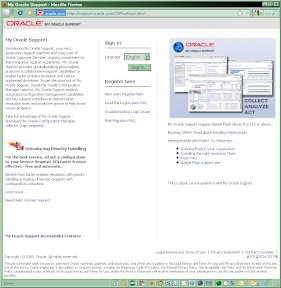
1) 访问My Oracle Support网站
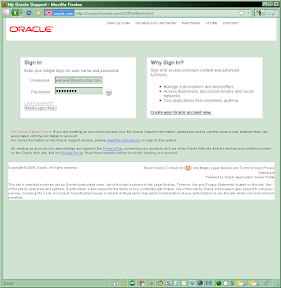
2) 登录
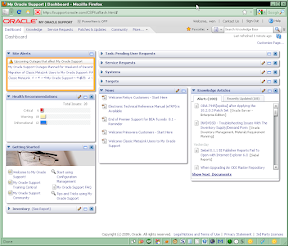
3) 选择"Patches & Updates"
4) 查找补丁
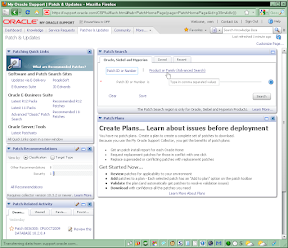
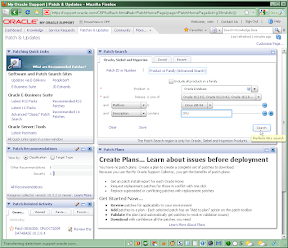
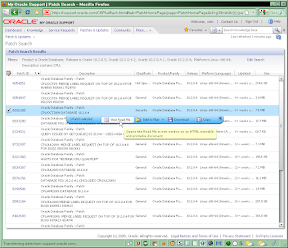
5) 单击选择该行, 弹出菜单, 选择"View Read Me"
6) 在说明文档的URL地址栏中找到ARU编号
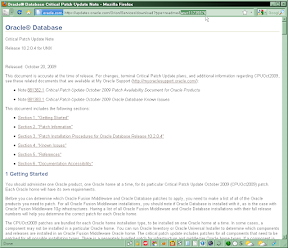
比如,得到10.2.0.4 Patch Set的下载地址是:
https://updates.oracle.com/Orion/Services/download/?aru=10029612然后用wget工具下载即可, 在命令行中还需提供登录用户名和密码, 如:
wget --http-user="myusername" --http-password="mypassword" "https://updates.oracle.com/Orion/Services/download/?aru=10029612"对有密码保护的补丁, URL中再加上patch_password参数, 如:
https://updates.oracle.com/Orion/Services/download/?aru=12345678&patch_password=nosuchpasswd
wget常见问题:
1. File name too long
报错"File name too long", 无法写文件
Resolving oracle-updates.oracle.com... 68.142.116.74, 68.142.116.73 Connecting to oracle-updates.oracle.com|68.142.116.74|:80... connected. HTTP request sent, awaiting response... 200 OK Length: 111,654 (109K) [application/zip] p8524113_10204_Linux-x86-64.zip?download_url=http:%2F%2Fupdates.oracle.com%2FARULink%2FDownload%2Fprocess_form&userid=o-wenxie@motorola.com&email=wenxie@motorola.com&record_download_url=http:%2F%2Fupdates.oracle.com%2FARULink%2FPatchDownload%2Fpack_stats×tamp=1260979159&patch_password=NO_PASS&context=A@10+H@aaru203.oracle.com+P@&aru=11423647&patch_file=p8524113_10204_Linux-x86-64.zip&ip_address=123.127.66.13&file_id=27511963&use_proxy=false&id=ZWtXM1l3WXFjVUlEZ2YwVDFUZ1ZOQTpHOWEvMlhXSTlRTDJRL2RKbXMvejJB: File name too long Cannot write to `p8524113_10204_Linux-x86-64.zip?download_url=http:%2F%2Fupdates.oracle.com%2FARULink%2FDownload%2Fprocess_form&userid=o-wenxie@motorola.com&email=wenxie@motorola.com&record_download_url=http:%2F%2Fupdates.oracle.com%2FARULink%2FPatchDownload%2Fpack_stats×tamp=1260979159&patch_password=NO_PASS&context=A@10+H@aaru203.oracle.com+P@&aru=11423647&patch_file=p8524113_10204_Linux-x86-64.zip&ip_address=123.127.66.13&file_id=27511963&use_proxy=false&id=ZWtXM1l3WXFjVUlEZ2YwVDFUZ1ZOQTpHOWEvMlhXSTlRTDJRL2RKbXMvejJB' (File name too long).
需要指定下载文件名, 该文件名可从wget输出中得到
文件名格式为:
p<补丁编号>_<数据库版本>_<操作系统>.zip如:
p6810189_10204_Linux-x86-64.zip也可在My Oracle Support查到
1) 访问My Oracle Support网站
2) 登录
3) 选择"Patches & Updates"
4) 查找补丁
5) 点该行开头的补丁编号
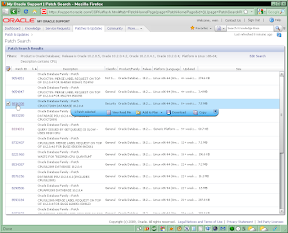
6) 显示出补丁详细信息, 单击"Show File Details"
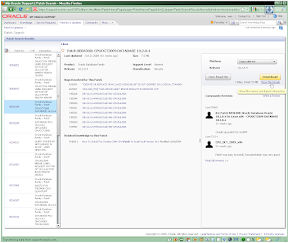
7) 显示出文件名
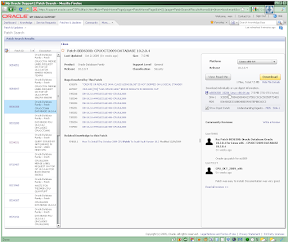
在wget命令中加-O选项指定下载文件名:
wget --http-user="myusername" --http-password="mypassword" -O "p6810189_10204_Linux-x86-64.zip" "https://updates.oracle.com/Orion/Services/download/?aru=11423647"
2. 加-c选项不能断点续传
报错304 Not Modified
Location: https://updates.oracle.com/Orion/Services/download/?aru=10029612 [following] --15:59:04-- https://updates.oracle.com/Orion/Services/download/?aru=10029612 Connecting to updates.oracle.com|141.146.44.51|:443... connected. HTTP request sent, awaiting response... 302 Found Location: http://oracle-updates.oracle.com/ARUConnect/p6810189_10204_Linux-x86-64.zip?download_url=http%3A%2F%2Fupdates.oracle.com%2FARULink%2FDownload%2Fprocess_form&userid=o-wenxie%40motorola.com&record_download_url=http%3A%2F%2Fupdates.oracle.com%2FARULink%2FPatchDownload%2Fpack_stats&email=wenxie%40motorola.com×tamp=1260979145&patch_password=NO_PASS&context=A%4010%2BH%40aaru204.oracle.com%2BP%40&ip_address=123.127.66.8&patch_file=p6810189_10204_Linux-x86-64.zip&aru=10029612&file_id=22503408&use_proxy=false&id=QUViSEhzNWVGZFlpMGZvVjBlRnZwQTppeWJXRk9Mc2xiVitPU2F1UTNrd21R [following] --15:59:05-- http://oracle-updates.oracle.com/ARUConnect/p6810189_10204_Linux-x86-64.zip?download_url=http%3A%2F%2Fupdates.oracle.com%2FARULink%2FDownload%2Fprocess_form&userid=o-wenxie%40motorola.com&record_download_url=http%3A%2F%2Fupdates.oracle.com%2FARULink%2FPatchDownload%2Fpack_stats&email=wenxie%40motorola.com×tamp=1260979145&patch_password=NO_PASS&context=A%4010%2BH%40aaru204.oracle.com%2BP%40&ip_address=123.127.66.8&patch_file=p6810189_10204_Linux-x86-64.zip&aru=10029612&file_id=22503408&use_proxy=false&id=QUViSEhzNWVGZFlpMGZvVjBlRnZwQTppeWJXRk9Mc2xiVitPU2F1UTNrd21R Resolving oracle-updates.oracle.com... 68.142.116.74, 68.142.116.73 Connecting to oracle-updates.oracle.com|68.142.116.74|:80... connected. HTTP request sent, awaiting response... 304 Not Modified 15:59:05 ERROR 304: Not Modified.
同样需要指定下载文件名:
wget --http-user="myusername" --http-password="mypassword" -c -O "p6810189_10204_Linux-x86-64.zip" "https://updates.oracle.com/Orion/Services/download/?aru=11423647"
3. HTTPS证书出错
加上--no-check-certificate选项
外部链接:
Classic MetaLink and My Oracle Support Transition Information Page
Retrieving Oracle patches with wget
Automated 'wget' patch downloads: issue resolution
-fin-


